








Why websites need meta tags
Meta tags are the part of HTML code enclosed between the <head> … </head> tag (page title). These attributes are optional: they are not visible to the user, but they report information about your website to the search engines like Google (description, title, keywords, etc.). But how to create meta tags?
Main functions are to provide information to search engine robots; serve as instructions for browsers, various services, and software; contain information about authorship, the source of the document.
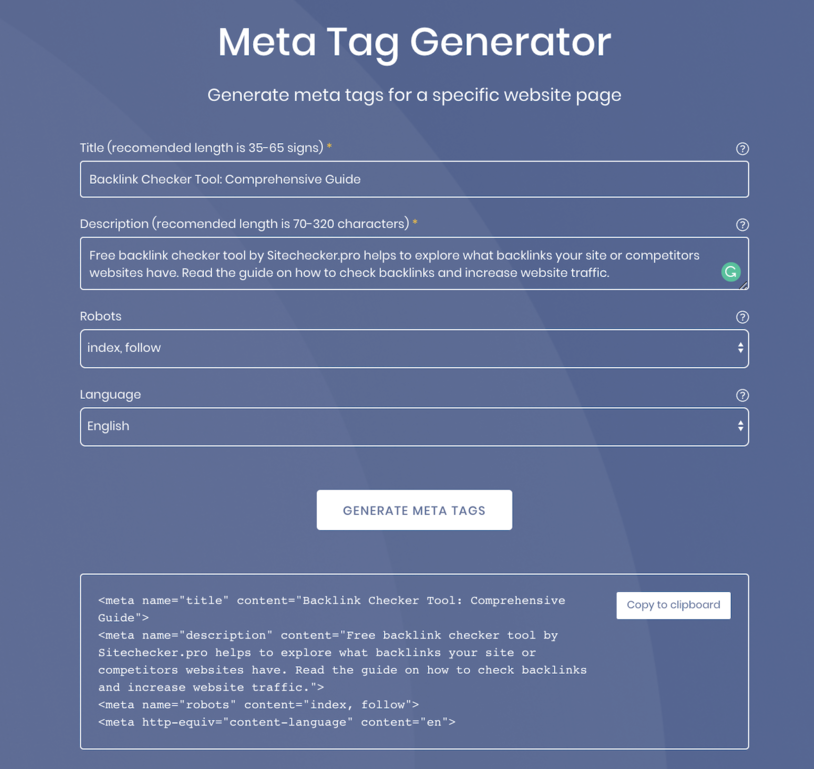
Meta tags are universal and supported only by some specific systems. Our free meta tags generator helps to create description and title tags in HTML.
The meta tag name = “description” can be used by search engines when generating a snippet, so it should:
- accurately describe the content of the page;
- make you want to click;
- include a target keyword.
Meta title is technically not a meta tag, but it is often assigned to this group because it contains information that is used by search engines and browsers. This HTML tag is important for SEO: it affects the ranking and clickability of the snippet:
- include a target keyword on the page;
- place the target keyword in the beginning;
- be unique and attractive to users;
- be limited to 70–80 characters in length.
How to use a meta tag generator?
Creating meta tags for your website is an important step. Sitechecker SEO meta tags generator is free and easy to use:
- Paste title into placeholder above. Remember the rules described previously;
- Add description. Write about the main idea of your website in a few words, don’t forget to add target keywords;
- Choose the right robots tag. Decide whether this web page should be followed and indexable by search engines, or not;
- Click on “Generate Meta Tags” button. Get the ready piece of HTML code to place into <head> … </head> tag.